Warehouse inventory
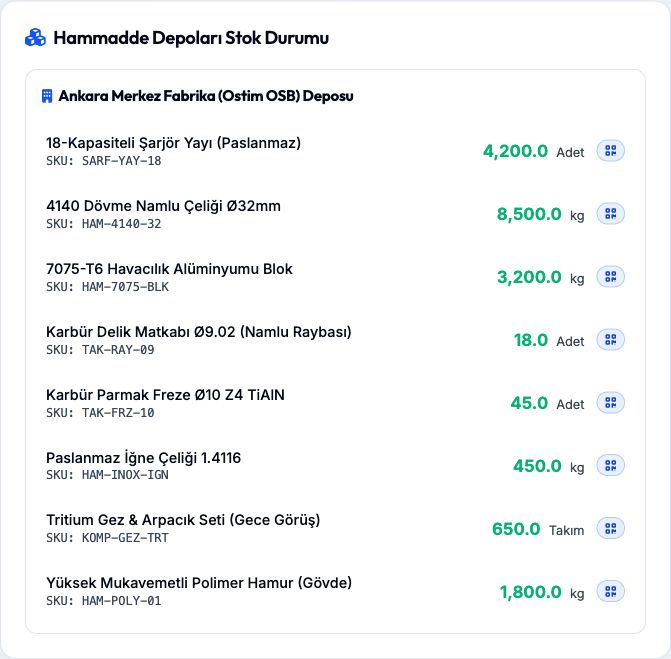
View material codes, quantities and units by warehouse.
 ✉
 RouteERP
An ERP and MRP project designed to support manufacturing operations through shared software.
routeerp.comActual product interface
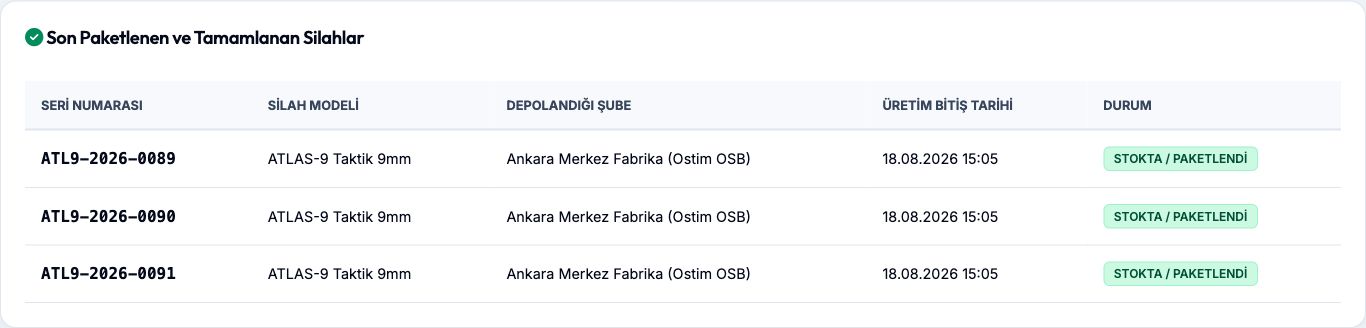
Actual interface with sample data, captured on 12 October 2026. These records are not customer performance results.
View material codes, quantities and units by warehouse.
View inspection types, part and lot details, sample sizes and acceptance or rework decisions.

View serial numbers, warehouse locations, completion dates and stock status for finished products.
Project focus
Route ERP is being developed to bring work orders, warehouse movements, quality records and bills of materials into one manufacturing flow. Its focus is to make related operational records easier to view together.
The published demo shows warehouse and inventory tracking, quality inspections and completed production records. Its figures are illustrative demo data, not verified customer outcomes or live business data.
Why Route ERP?
When planning, production, quality and warehouse processes operate in isolation, seeing the real picture becomes difficult. Route ERP brings them together in one manufacturing-focused cloud platform.
Work orders, routes and actual cycle times become visible while production is running.
Inventory, quality and production records connect from raw material lot to final shipment.
Tolerance measurements, quality records and drawing revisions remain under control.
Platform scope
Modules operate as connected parts of the same production chain—from order to shipment.
Work orders, machine routes and planned versus actual cycle times.
Location, barcode, lot and serial-number based inventory control.
Incoming quality, process checks, tolerances and nonconformities.
Multi-level BOMs, recipes and revision-controlled technical documents.
Material requests, supplier quotations and external operations.
Shift plans, leave, overtime and operator competence records.
Connected flow
Delivery date, product information and technical requirements enter the system.
BOM-driven requirements trigger inventory and purchasing actions.
Operations are assigned to machines and shop-floor activity is recorded.
Measurements, nonconformities, lot and serial data are connected.
Approved parts are labelled, issued from stock and prepared for dispatch.
Explore the project